
Amazon Product Variation Guide: Parent-Child Listings, Variations and Common Mistakes
 September 3, 2026
 Yashwardhan Singh
 0 Comments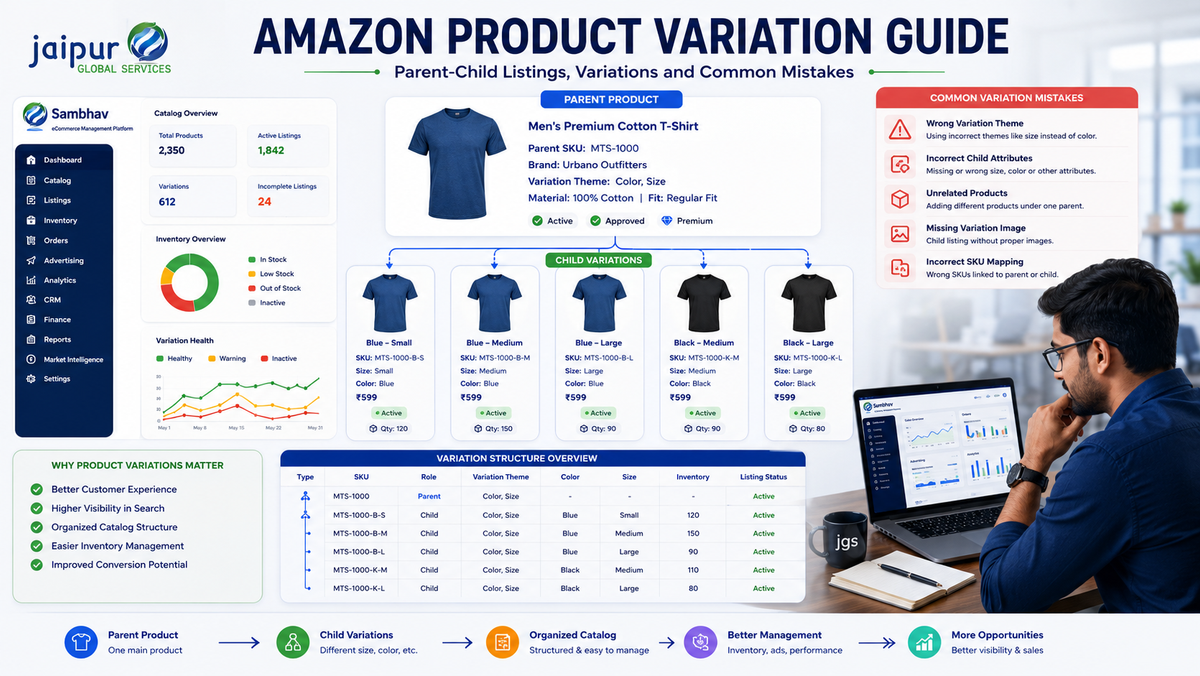
If you sell a product that comes in different sizes, colors, or styles, you have probably faced this question: should each option get its own listing, or should they be linked together? This is a common point of confusion for Amazon sellers, and getting it wrong can create catalog problems down the line.
This is where Amazon Product Variations come in. When used correctly, variations let related products sit under one shopping page, making it easier for buyers to compare options and easier for sellers to manage connected SKUs. Used incorrectly, they can lead to listing issues, confused customers, and messy catalogs. This guide covers what variations are, how to set them up, and the mistakes to avoid.
What Are Amazon Product Variations?
An Amazon product variation groups related versions of the same product under a single "parent" listing, with each version living as a separate "child" listing underneath it. Customers see one page with dropdown options (like size or color), and each option leads to a specific, purchasable SKU.
Amazon uses this parent-child structure so closely related products can share one listing page instead of appearing as unrelated search results. The parent itself is not sellable — it exists to hold the variation family together. Each child has its own ASIN, SKU, price, stock level, and images, and is what the customer actually buys.
A simple example:
Parent: Cotton T-Shirt Children: Small / Medium / Large
Or:
Parent: Water Bottle Children: Blue / Black / Red
The key rule to remember is that variation relationships should only be used when the products genuinely belong together as the same core item, and when they meet Amazon's applicable category rules. Variations are a catalog structure, not a shortcut for grouping different products.
Parent vs. Child Listings: What's the Difference?
Beginners often mix up these terms:
- Parent listing – The umbrella listing holding the family together. Not directly purchasable.
- Child listing – An individual, sellable version (for example, "Medium, Blue") with its own SKU and ASIN.
- Variation theme – The attribute used to connect children, such as size, color, or size-color.
- SKU – Your internal identifier for a specific variant.
- ASIN – Amazon's unique identifier for each listing.
- Product attributes – Details like size, color, or material that distinguish children within a family.
Think of the parent as the "folder" and the children as individual files inside it.
Common Amazon Variation Themes
Depending on the category, Amazon may support variation themes such as:
- Size
- Color
- Size + Color
- Style
- Flavor
- Pack size
- Other category-specific themes
Not every theme is available in every category, and Amazon periodically updates which options a category supports. Before planning a variation family, it's worth checking your specific category's current requirements in Seller Central rather than assuming a theme will be available.
How to Create an Amazon Listing With Variations
If you're planning to create an Amazon listing with variations from scratch, here's a general overview:
- Choose the correct product category for your item.
- Confirm that the category supports variations.
- Select a variation theme that genuinely fits your product (size, color, and so on).
- Create or identify the parent listing.
- Add each relevant child product under that parent.
- Enter accurate SKU and product details for every child.
- Fill in the variation-specific attributes correctly for each child.
- Upload clear, accurate images for each variation.
- Review the full parent-child relationship before submitting.
- Check the live listing after Amazon processes the update to confirm everything displays correctly.
Seller Central's exact screens and button names can change over time, so it's best to follow the current interface rather than relying on older screenshots or guides.
How to Add a Variation to an Existing Amazon Listing
Many sellers already have a live listing and want to know how to add a variation to an existing Amazon listing — for example, launching a new color for a product that's already selling. Here's the general approach:
- Check whether an existing parent-child relationship already fits your new product, or whether one needs to be created.
- Confirm the new item genuinely belongs to the same variation family — same core product, different attribute.
- Select the correct variation theme for the update.
- Add the new child SKU with complete and accurate details.
- Provide correct attributes so the new child fits the pattern.
- Double-check images and listing content for the new variation.
- Review the updated listing after Amazon processes the change.
This same process applies whether you're looking to add a new variation to an existing Amazon listing or trying to connect a brand-new product to a family that already exists. Seller Central options can vary slightly by account and category, so treat this as a general roadmap rather than an exact click-by-click script.
When Should You NOT Create a Variation?
Not every product should be linked as a variation. Common problematic practices include:
- Grouping unrelated products together just to share one page
- Using a variation theme that doesn't genuinely apply
- Presenting different products (not just different attributes) as variations
- Creating variations mainly to pull reviews onto another child
- Combining items that don't share a genuine product relationship
- Adding attributes that don't accurately describe the item
Incorrect variation relationships can lead to catalog issues requiring correction later, so it's worth being cautious upfront.
Common Amazon Product Variation Mistakes
- Wrong variation theme – Using a theme that doesn't match the actual product differences.
- Unrelated products grouped together – Combining items that aren't truly the same product.
- Incorrect child attributes – Attributes that don't match the real product, confusing search and filtering.
- Duplicate or confusing SKUs – Poor SKU naming makes inventory tracking harder.
- Poor variation-specific images – Generic or mismatched images across children.
- Inconsistent product information – Titles or descriptions that contradict each other across the family.
- Ignoring category-specific rules – Assuming a theme is allowed without checking current requirements.
- Treating every child as identical – Overlooking real differences in materials or specifications.
- Not checking listings after updates – Failing to confirm the change went live correctly.
- Manual management of large variation sets – Handling dozens of SKUs by hand without a structured process, which increases errors.
How Proper Variation Management Helps Amazon Sellers
Done correctly, good variation management offers practical, operational benefits:
- Better catalog organization
- Easier SKU-level management
- A clearer selection experience for customers
- Reduced catalog confusion
- Simpler inventory tracking
- Better overall visibility into your product family
- More efficient handling of large catalogs
These are operational improvements — proper variation setup won't guarantee specific ranking or sales outcomes, but it does reduce friction in how your catalog runs day to day.
How JG Services Helps With Amazon Catalog and Variation Management
For sellers managing multiple SKUs, several variation families, or frequent listing updates, this catalog work can become time-consuming. This is where an experienced partner like Jaipur Global Services (JGS), an ecommerce growth and marketplace management company, can help.
Jaipur Global Services (JGS) supports sellers with Amazon catalog and listing management, marketplace operations, and product data organization — useful for businesses juggling large catalogs, multiple marketplaces, or recurring catalog errors, keeping variation families accurate as the catalog grows.
How Sambhav Can Help Sellers Manage Ecommerce Operations
Beyond individual listing fixes, many sellers eventually need a more centralized way to manage operations. Sambhav, Jaipur Global Services (JGS) ecommerce seller platform, is built for this. You can learn more on the official Sambhav page.
Sambhav supports sellers across catalog and product information management, SKU-level organization, marketplace operations, order and inventory workflows, advertising management, growth analytics, CRM, finance reconciliation, and market intelligence. It isn't a tool that automatically creates or approves Amazon variations — it's a platform designed to bring your ecommerce workflows into one operating system.
The underlying idea is simple: better catalog organization leads to better operational control, which leads to easier marketplace management. If you're looking for a more structured way to run your ecommerce operations, it's worth exploring what Sambhav offers.
FAQs
What are Amazon Product Variations?
They are related versions of the same product (like different sizes or colors) grouped under one parent listing, with each version sold as an individual child listing.
How do I add a variation to an existing Amazon listing?
Confirm the new product belongs to the same family, select the correct variation theme, add the child with accurate attributes and images, then review the listing after it updates.
Can I add a new variation to an existing Amazon listing?
Yes, as long as the new product genuinely fits the existing variation family and meets the category's current requirements.
What is the difference between a parent and child listing on Amazon?
The parent is the umbrella listing holding the family together and isn't directly sellable; each child is an individual, purchasable SKU with its own ASIN.
Can every Amazon product have variations?
No. Variation availability depends on the category and Amazon's current rules, and variations should only be used when products genuinely share the same core identity.
Conclusion
Amazon product variations, when set up correctly, make shopping easier for customers and catalog management easier for sellers. The key is ensuring every parent-child relationship is genuine, every attribute is accurate, and category rules are followed. Getting this right reduces catalog confusion and builds a stronger operational foundation as your product range grows.
If your catalog is getting harder to manage — multiple variation families, frequent updates, or too many SKUs to track by hand — professional support from Jaipur Global Services (JGS), or a centralized platform like Sambhav, can help you stay organized as you scale.