
Amazon Search Query Performance: How to Find Keywords That Actually Drive Sales
 September 1, 2026
 Yashwardhan Singh
 0 Comments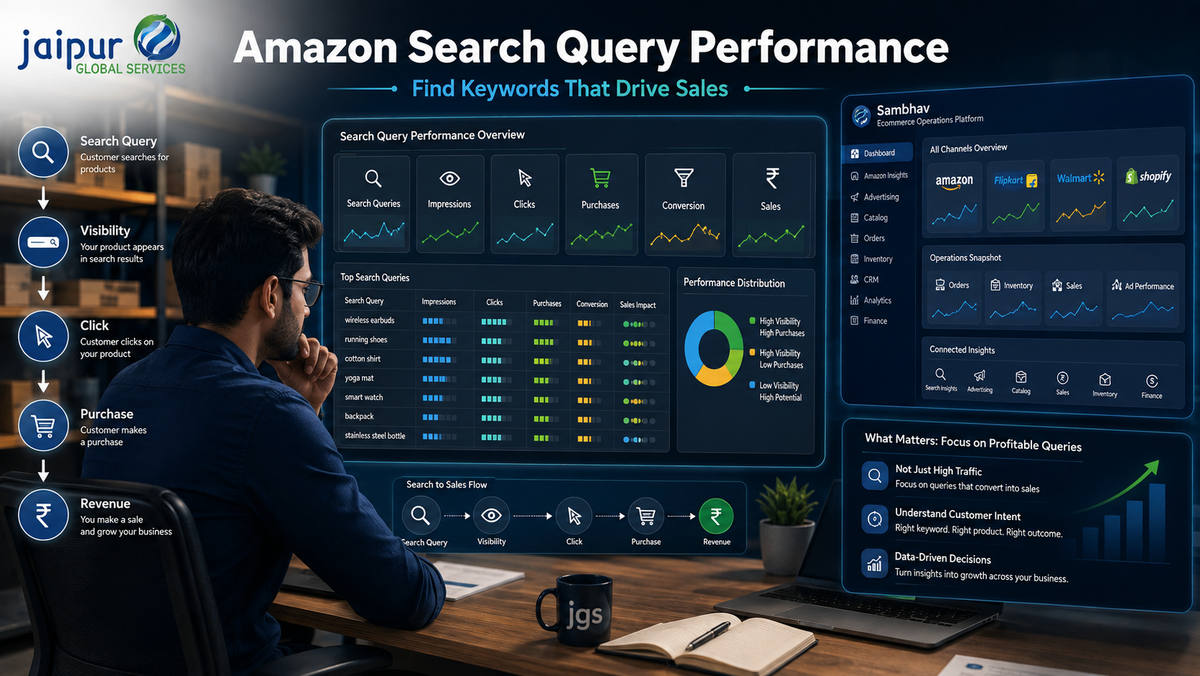
Many sellers spend hours researching keywords, rewriting titles, and running Amazon Ads — and still can't say with confidence which customer searches actually contribute to sales. High search volume feels like a good signal, but it isn't the same as demand for a listing is actually capturing. A keyword can generate impressions, clicks, or product page visits without ever generating a purchase.
This is the gap Amazon Search Query Performance data is built to close. It doesn't just show what customers are searching for; it shows how your products actually perform against those searches, stage by stage. The real question isn't which keywords get the most attention — it's which amazon search query terms translate into meaningful business results.
What Is Amazon Search Query Performance?
Search Query Performance (SQP) is a report inside Amazon's Brand Analytics, available to sellers enrolled in Brand Registry through Seller Central (Brands → Brand Analytics → Search Query Performance). It provides search-query-level insight into how your brand and products perform against the terms customers typed in to find them — not an estimate of demand, but data drawn from actual Amazon search behavior tied to your catalog.
The relationship it captures generally looks like this:
Customer Search Query → Product Visibility (Impressions) → Clicks → Product Interaction → Purchases
It's worth being precise about what this covers: SQP reflects activity starting from Amazon's search results page. It doesn't account for customers who navigate directly to a product page through other means, and — since it's only available to Brand Registry-enrolled sellers — it isn't accessible to every Amazon seller by default.
What Is an Amazon Search Query Performance Report?
The amazon search query performance report is best understood as a customer-intent and funnel-performance dataset, not a simple keyword list. For each search query tied to your brand or ASIN, it shows how that query performed across the funnel — from how often your listing appeared, to how often it was clicked, to how often it led to a purchase — along with share metrics (impression share, click share, purchase share) that indicate how much of that query's activity your listings are capturing relative to the wider market.
Sellers can typically view this data at brand level (top search queries across the whole product line) or ASIN level (queries driving traffic to one product), over weekly, monthly, or quarterly periods. Read as a performance and intent dataset, the report tells a very different story than a keyword tool's estimated search volume.
How to Find Keywords That Actually Drive Sales
Step 1 — Identify relevant search queries. Start with queries most closely related to your product, from both existing SQP data and keyword research.
Step 2 — Review visibility. Check which queries generate meaningful impression share for your listings. Strong relevance with weak visibility may need SEO or advertising attention.
Step 3 — Analyze clicks. Identify which queries attract customer interest once your listing appears — this points to how compelling your titles, images, and pricing look at the search results stage.
Step 4 — Compare purchases and conversion signals. Where the report provides purchase-related data, identify which queries are actually converting, not just generating traffic.
Step 5 — Look for gaps. The most useful insights often sit in the gaps: strong visibility and interest, but weaker purchase performance. These gaps can point to opportunities in listing optimization, images, value proposition, pricing, or advertising — though not every gap is caused by keyword targeting alone, and each should be investigated on its own merits.
How to Read Amazon Search Query Data
The following examples are hypothetical, meant to illustrate patterns — not actual Amazon benchmarks or figures.
Query A: high visibility, high clicks, high purchases. Likely a strong, high-value search query already working well for the listing.
Query B: high visibility, high clicks, low purchases. Customers are finding and clicking the listing, but something at the product page — price, images, reviews, or content — may be causing hesitation. A potential conversion problem, not a discovery problem.
Query C: low visibility, but strong relevance to the product. May represent an underused opportunity — worth testing through better organic optimization or targeted advertising to capture more available demand.
These patterns are starting points for investigation, not guaranteed diagnoses — the actual cause behind any gap still needs confirming against the listing and market context.
Amazon Search Query Performance and Amazon SEO
Search query insights can inform several parts of a listing: titles, bullet points, descriptions, A+ Content, backend search terms, main images, and overall positioning. If a query shows strong relevance and purchase potential but weak visibility, that's a signal worth reflecting in the listing's language and structure.
That said, adding a search query to a listing doesn't guarantee better rankings or more sales on its own. Amazon keyword optimization works best when relevant terms are integrated naturally and accurately, describing the product rather than inserted to match a query. Good Amazon listing optimization treats search query data as one input among several, alongside content quality, images, and pricing.
Amazon Search Query Performance and Advertising
Search query data pairs naturally with Amazon Ads reporting, though the two aren't the same and one doesn't replace the other. Ads search-term reports show how specific ad targets performed within campaigns — impressions, clicks, conversions, ACOS, and ROAS at the campaign level. SQP shows how the query performed across the marketplace more broadly, including organic activity.
Used together, they build a fuller view: SQP can help identify which queries deserve dedicated Sponsored Products, Sponsored Brands, or Sponsored Display targeting, while advertising data shows how those targets actually perform once campaigns run. A practical workflow:
Search Query Data → Identify Relevant Search Intent → Listing Optimization → Advertising Testing → Monitor Performance → Refine Strategy
Common Mistakes Sellers Make With Amazon Search Queries
Sellers often choose keywords based on search volume alone, without checking whether those queries convert. Others ignore conversion entirely, treat every query as equally valuable, resort to keyword stuffing, or lose sight of product relevance. Some look only at advertising data while ignoring organic performance, or vice versa. Failing to compare performance over time, making decisions from a single metric, and ignoring profitability are also common pitfalls.
The best keyword isn't necessarily the one with the highest search volume. The better question is: does this search query attract the right customer and contribute to a commercially useful outcome?
From Search Query Data to a Better Amazon Strategy
DISCOVER → ANALYZE → OPTIMIZE → TEST → MEASURE → SCALE
Discover relevant customer search queries from SQP and keyword research. Analyze the performance signals available. Optimize listing content and relevance where gaps appear. Test advertising, content, or positioning changes based on what the data suggests. Measure whether those changes actually move performance. Scale the approach that demonstrates real business results.
Why Sellers Need a Broader Ecommerce Data View
Search query data tells sellers a great deal about customer demand and how listings perform in the search funnel. But it's only one part of the picture. Sustainable performance also depends on sales, orders, advertising spend, catalog accuracy, inventory availability, returns, customer activity, finance, and marketplace performance more broadly. A search query might be converting well, but if inventory runs out or fulfillment falters, that demand won't turn into realized sales. Understanding customer intent is necessary, but it isn't sufficient on its own — it needs to connect to the operational and financial reality of the business.
How JGS Helps Amazon Sellers Turn Data Into Action
JGS (Jaipur Global Services) is an ecommerce services and technology company supporting sellers with marketplace growth and operations. JGS works with Amazon sellers on account management, catalog and listing management, and advertising, helping translate search and performance data into practical listing and campaign decisions — with support for sellers expanding internationally.
How Sambhav Can Help Sellers Manage Ecommerce Data and Operations
Sambhav, JGS's in-house SaaS platform, doesn't generate Amazon Search Query Performance reports — that data lives inside Amazon's own Brand Analytics. What Sambhav does is help sellers manage the broader ecommerce operations that search insights need to connect to: catalog management, advertising, CRM, real-time sales and performance analytics, and finance and payment reconciliation, in one operating environment.
Amazon Search Insights + Advertising Data + Catalog Data + Sales Data + Operational Data + Financial Data → Centralized Ecommerce View → Better Decision-Making
Customer-intent insights from SQP are more useful alongside product availability, catalog quality, advertising spend, sales trends, and profitability — rather than in isolation. Sambhav doesn't guarantee keyword rankings, conversions, or ROAS; it supports a more connected view of the data sellers need to act on search insights with real business context.
FAQ
1. What is Amazon Search Query Performance?
It's a Brand Analytics report available to Brand Registry-enrolled sellers in Seller Central, showing how your products perform against specific customer search queries — from impressions through clicks to purchases.
2. What is an Amazon Search Query Performance report?
A dataset that shows funnel-level performance (impressions, clicks, purchase-related signals, and share metrics) for each search query tied to your brand or ASIN, viewable at brand or product level.
3. How can Amazon Search Query Performance help sellers?
It helps sellers see which search queries are generating visibility, interest, and purchases — and where gaps exist between visibility and conversion that may need listing, pricing, or advertising attention.
4. How do I find keywords that drive sales on Amazon?
Identify relevant search queries, review visibility and click data, compare purchase signals where available, and look for gaps where strong interest isn't converting — those often reveal the highest-value opportunities.
5. Is Amazon Search Query Performance the same as keyword research?
No. Keyword research tools estimate demand and surface potential keywords; Search Query Performance shows how your actual listings perform against real Amazon search behavior. The two work best together.
6. Can Search Query Performance data improve Amazon SEO?
Yes — it can inform titles, bullet points, descriptions, A+ Content, and backend search terms, though adding a query to a listing doesn't guarantee better rankings on its own.
7. Can Search Query Performance data help with Amazon advertising?
Yes. It can help identify which queries deserve dedicated ad targeting, complementing (not replacing) Amazon Ads' own search-term reporting.
8. How can JGS and Sambhav help Amazon sellers manage ecommerce data?
JGS supports account management, catalog optimization, and advertising execution, while Sambhav centralizes catalog, advertising, CRM, and performance data so search insights can be considered alongside broader business context.
Conclusion
The goal of Amazon keyword research shouldn't be finding the biggest keyword — it should be identifying search queries that represent genuine customer intent and contribute to meaningful business outcomes. That requires combining search query insights with listing optimization, advertising, sales data, operations, inventory, and financial information, rather than treating any one signal in isolation.
JGS helps Amazon sellers turn marketplace data into practical action, while Sambhav supports a more centralized view of the ecommerce operations and analytics that search insights need to connect to.
Want to turn Amazon search and marketplace data into a more connected ecommerce growth strategy? Talk to JGS to understand your marketplace requirements and explore how Sambhav can support your ecommerce operations and analytics.